


VK: music, video, messenger
3.111.31K Reviews
App Specs
- Version
- 8.180
- Updated On
- License
- Free
- Downloads
- 100,000,000+
- Developer
- VKL
- Categories
- Social
- Platform
- Android, iOS
Screenshots

 Analysis by AppCompare
I usually reach for a social app with a particular need in mind: I want to message someone, find something to watch, or listen while I’m doing something else. What makes VK: music, video, messenger interesting is that it puts those activities under one roof. That can save me from bouncing between separate apps, but it also asks me to accept a busier, more all-purpose experience than a dedicated messenger or music player. My impression is that it works best when the people I want to reach and the content I want to explore are already part of the same VK routine.
That distinction matters before you install it. VK is a social networking app from developer VKL, and its appeal is not simply that it can handle several kinds of media. It is that conversations, feeds, communities, and entertainment can sit alongside one another. If I am already connected to friends or groups there, the combination can feel useful rather than cluttered. If everyone I know uses another network, the extra music and video options may not be enough to make VK my main place to keep in touch.
The app is free to download, with in-app purchases ranging from around fifty cents to about one hundred and twenty-five dollars per item. That price range is worth keeping in mind if I prefer to avoid optional spending: I would check the purchase details before confirming anything rather than assume that every part of the experience is included at no cost. VK is rated for teens, so it is aimed at a broad social audience, not just adults. I would still treat public posting and contact with unfamiliar people thoughtfully, as I would on any social network.
Getting Started with VK
Setting up VK: music, video, messenger is a breeze. You download it from your app store, and you’ll be prompted to create an account. You can sign up with your phone number or through Facebook. Once you’re in, you get a clean interface that’s easy to navigate. The app gives off a Facebook-meets-Spotify vibe, which is kind of cool.
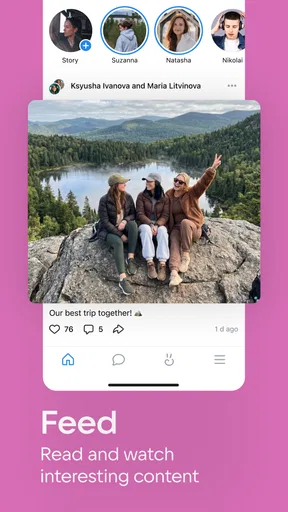
First thing I noticed was how everything is laid out. You've got your feed, your music, your videos, and your messenger all lined up neatly at the bottom of the screen. It’s intuitive, and even if you’re not super tech-savvy, you’ll find your way around in no time.
For me, the practical test is not whether I can find each area once, but whether I can return to the thing I meant to do without getting sidetracked. A feed naturally invites browsing, while a message usually has a clear purpose. I’d start by deciding which of those jobs I want VK to handle most often, then spend a little time setting up the people and communities that make that job worthwhile. That small bit of housekeeping can make a multi-purpose app feel like a useful home base instead of a wall of unrelated updates.
VK has been around since June 14, 2011, and its current version is 8.179. It has more than one hundred million installs, with an average rating of about 3.1 from roughly nine million ratings and around eleven thousand written reviews. I take that combination as a reminder to approach it with a clear idea of what I need: its reach means there is a substantial audience, but popularity alone does not guarantee that its mix of features will suit my habits. I would judge it by whether my friends, groups, and preferred content are actually there.
Worth Reading Before You Choose

Flipboard Shows What News Apps Must Do Beyond the Feed

Switching to Android Auto Means Rethinking Your Driving Routine

Google Calendar Makes a Crowded Week Easier to Manage

Ludo King Makes the Most of the Minutes Between Plans

Baby Panda World Brings Quick Play to Modern Phones, but Its Game Library Feels Busy

ESPN’s Live Game View Makes Following Close Games Easier
Music and Videos Galore
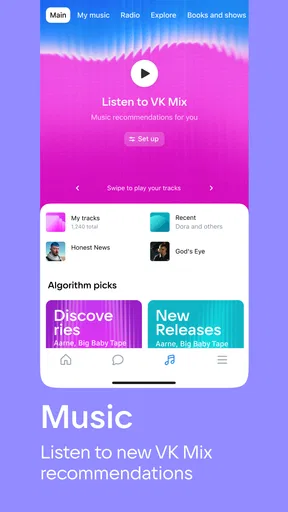
Now, let’s talk about the music and video features. VK lets you stream a vast library of music. You can search for your favorite artists, create playlists, and even discover new tunes based on your listening habits. It’s like having your personal DJ. And the best part? You can listen offline, which is a lifesaver when you’re on the go with no internet.
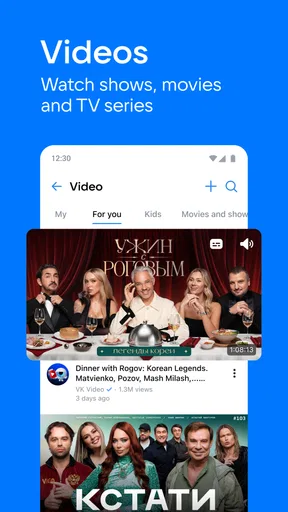
The video feature is equally impressive. Whether you want to catch up on the latest viral videos or explore something new, VK has it all. The app even suggests videos based on your interests, which is a nice touch. It’s like YouTube but with a more personalized twist.
A useful way to approach the entertainment side is to give search and recommendations different jobs. I use search when I already know what I want, such as a particular artist or clip; recommendations are better treated as a browsing lane for when I have time to discover something. That separation keeps a quick lookup from turning into an unplanned session of scrolling. It also gives me a way to decide whether VK’s suggestions are actually helping: if I keep skipping them, I can return to deliberate searches rather than treating every recommendation as a must-watch.
Offline listening can be valuable in a very ordinary situation: I’m getting ready to leave, know I’ll be somewhere with an unreliable connection, and want to have music ready instead of relying on a stream at the last minute. I’d prepare what I want to listen to while connected and check that it is available offline before heading out. That is a more dependable workflow than assuming a playlist will work without a signal. It also keeps the music side useful even when I am not actively checking the social feed.
Video is a different kind of time commitment. A short clip can fit between tasks, but recommendations can make it easy to keep watching when I intended to open the app for only a minute. I would use the video area when I actually have room to browse, and use messaging or a direct search when I am trying to get something done. That is not a fault unique to VK, but having entertainment next to communication makes the distinction especially useful: one quick check can become a longer visit if I do not decide what I came for.
Chatting and Connecting
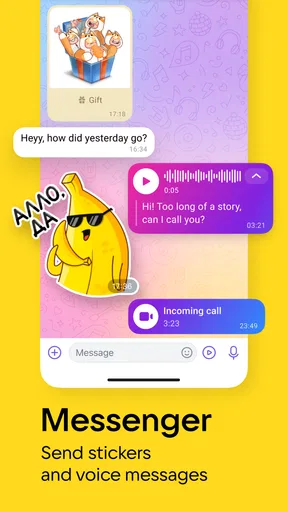
Messaging on VK is straightforward. You can chat with friends, send voice messages, and even make calls. The app also supports group chats, which is perfect for staying connected with your squad. What’s cool is the integration of multimedia in chats, making it easy to share music and videos directly from the app.
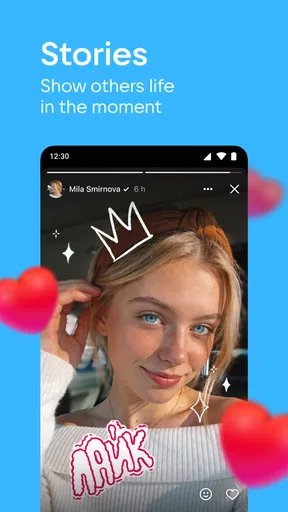
Plus, VK has a feature called "Stories," just like Instagram. You can share your moments in photos or videos, add some funky stickers, and see what your friends are up to. It’s a fun way to keep your social life buzzing.
The handoff between watching something and sharing it is one of the more natural reasons to keep these tools together. If a clip or track gives me an idea for a conversation, I can move from enjoying it to sending it in a chat without first switching to a separate service and searching again. For a group planning a night out, for example, I could share a video that explains the mood I have in mind, then use the group conversation to settle details. The benefit is convenience; the trade-off is that the content only helps if the people in that conversation can access and want to open it.
For an everyday routine, imagine I am commuting and a friend asks what I am listening to. I can answer in the conversation, share something relevant, and return to the music without making the messenger and player feel like separate errands. Later, if plans change, a group chat and a call offer different ways to bring everyone into the same discussion. I would choose a message when the information can wait, and a call when a quick back-and-forth is easier than typing. That choice is simple, but it is exactly where having several communication options in one social app can save a few steps.
Stories serve a different purpose from a direct conversation. I think of them as lightweight updates for people who follow my activity, not as a substitute for telling a specific friend something important. If I need a clear response, a direct message or group chat is the more reliable place to start. If I just want to share a small moment without building a whole post around it, Stories make more sense. Keeping those intentions separate helps reduce the common social-app problem of posting broadly and then expecting the right person to notice.
Personalization and Privacy
VK offers some neat personalization features. You can customize your profile, set your status, and even choose who gets to see your posts. Privacy settings are pretty robust, which is important in today’s digital age. You can control who sees what, ensuring your personal info stays safe.
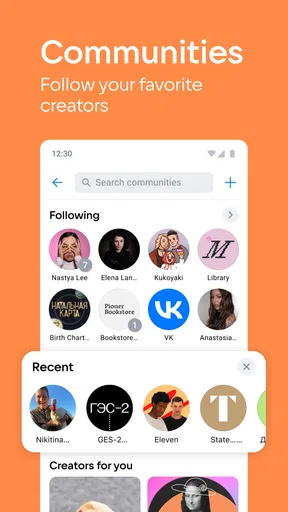
Moreover, the app lets you join communities and groups based on your interests. Whether you’re into cooking, gaming, or travel, there’s a community waiting for you. It’s a great way to connect with like-minded people from around the globe.
I would treat privacy controls as something to review deliberately, rather than a task to postpone until after I have started posting. Before sharing widely, I’d look at who can see my posts and profile details, then decide whether the audience I want is friends, a group, or a broader circle. The useful habit here is to revisit that choice when my use changes: a profile used mainly to talk with close friends may need different boundaries from one used to participate in public-interest communities. A setting that feels appropriate for one type of post may not be what I want for another.
Communities can also change the balance of the app. They are useful when I want to follow a shared interest without needing every update to come from a person I know. But joining many groups at once can make the feed noisier and blur the distinction between close contacts and general interests. I’d begin with a small number of communities that genuinely add something, then keep only the ones I return to. That is a practical way to make discovery work for me instead of letting every new interest become another source of updates.
Compared with a dedicated messenger, VK’s advantage is the nearby feed, media, and community activity; its compromise is that it can feel like more app than I need when all I want is a private exchange. Compared with a standalone music or video service, its appeal is the social context and the ability to move content into conversations. A specialized service may be the better choice if I care most about a focused listening or viewing routine. I would not switch solely for the promise of having everything together; I would switch if the people and content I value are genuinely active here.
Where the Flow Can Break
The main friction is the same quality that makes VK appealing: there is a lot going on. When messages, a feed, communities, music, and videos all compete for attention, a clear starting purpose helps. I would open the app to answer a message, find a track, or browse a group, rather than treating every notification or recommendation as equally urgent. If I find myself spending more time navigating than doing what I came to do, a simpler dedicated app may be a better fit for that particular task.
Another practical question is whether VK can replace the apps I already use. I would not assume that one social network will immediately take over every conversation or entertainment habit. A sensible test is to use it for one real workflow first: perhaps a group chat with people already there, or a music routine where offline listening matters. If that use feels smooth and the people involved respond, I can gradually make it part of more of my day. If the social circle is elsewhere, keeping VK as an occasional discovery app may be more realistic than trying to move everyone.
It is also worth being intentional about optional purchases. The app costs nothing to download, but in-app purchases are available, so I would check the price shown in the purchase flow and make sure it is something I actually want before confirming. That is especially sensible in an app used for several kinds of activity, where a purchase prompt may appear during a session that began for a different reason. I prefer to separate the decision from the moment: if a paid option is not part of the task I opened VK to complete, I can leave it and consider it later.
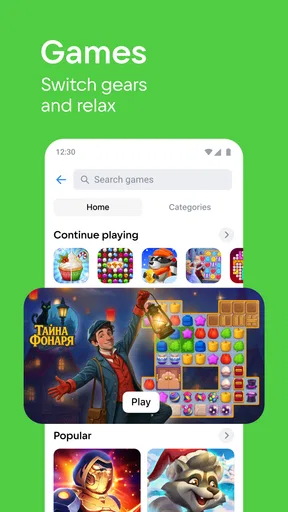
For a first-time user, the most useful questions are practical. Can I find the people I want to talk to? Do the communities I care about have activity that feels relevant? Does the music and video mix add convenience, or would I rather keep those habits in specialist apps? I would answer those questions through a short trial of my own routine rather than by judging the number of features. If the same people and content make the app feel connected, its breadth is a strength. If I mostly ignore the social side, that breadth may simply add clutter.
Final Thoughts
All in all, VK: music, video, messenger is a solid app if you’re looking to combine your social media and entertainment needs. It’s packed with features that keep you engaged, whether you’re a music lover, a video enthusiast, or just someone who loves to chat. The app is versatile, user-friendly, and offers a unique social experience.
So, if you’re curious and want to explore a new side of social media, give VK a shot. You might just find it’s your new favorite app. Happy exploring!
I would recommend it most to someone who already has a reason to be in VK: friends who reply there, communities worth following, or a real desire to bring media and conversation closer together. It is less compelling for someone who wants a quiet, narrowly focused tool or who would have to persuade an entire social circle to move. My own advice is to start with one clear use, check the audience and privacy choices before posting, and see whether the handoff between chat and entertainment actually saves effort. If it does, VK’s all-in-one character is useful; if not, using separate apps is a perfectly sensible choice.
Pros
- User-friendly interface enhances navigation.
- Wide variety of music and video content.
- Integrated messenger for easy communication.
- Offline mode for media without internet.
- Personalized recommendations improve user experience.
Cons
- Contains ads in the free version.
- Limited features without premium subscription.
- Occasional app crashes reported by users.
- Regional restrictions on some content.
- Data-heavy
- may consume more mobile data.
FAQs for VK: music, video, messenger
What features does VK offer for music lovers?
VK provides a comprehensive music experience, allowing users to stream and download millions of tracks. You can create playlists, share music with friends, and discover new artists. The app also offers personalized recommendations based on your listening habits, making it easy to find your next favorite song.
Can I use VK as a messaging app?
Yes, VK functions as a full-featured messenger. You can send text messages, voice notes, and make video calls. The app supports group chats and offers various stickers and emojis to enhance your messaging experience. It's a versatile platform that combines social networking with robust communication tools.
Is VK available for both Android and iOS?
VK is available for both Android and iOS devices. You can download it from the Google Play Store for Android or the App Store for iOS. The app is regularly updated to ensure compatibility and provide users with new features, security enhancements, and performance improvements on both platforms.
How does VK handle privacy and security?
VK takes user privacy and security seriously. The app includes settings to control who can see your profile and posts. It also provides options to block or report users, and utilizes encryption for messages to protect your data. Regular updates ensure that security measures are up-to-date.
Are there any subscription fees for using VK?
VK offers many features for free, but there is a subscription service known as VK Music. This subscription provides an ad-free experience, offline music downloads, and higher quality audio. While the basic app remains free, the subscription enhances the music streaming experience for dedicated users.


